What You Can Do
Review the exact stock increase before posting a physical delivery.
Before You Begin
Mark the purchase as purchased first. Count the goods that arrived now, not everything ordered or previously received. Check the business, purchase unit and Inventory stock unit.
How To Do It
- Open Operations > Purchasing > Receiving. Choose a Source plan or All open purchases, then select the purchase in Awaiting Receipt.
- Review Purchased, Received and Outstanding. Check Linked inventory and the displayed conversion. Use Change or Inventory link & units if a mapping needs review; save that mapping before receiving.
- Enter Quantity received in the stated purchase unit. For a partial delivery, enter only that part. Open Receipt notes if needed.
- Check Will add to inventory and the On hand / After receipt preview. Saving a link or price does not post this stock.
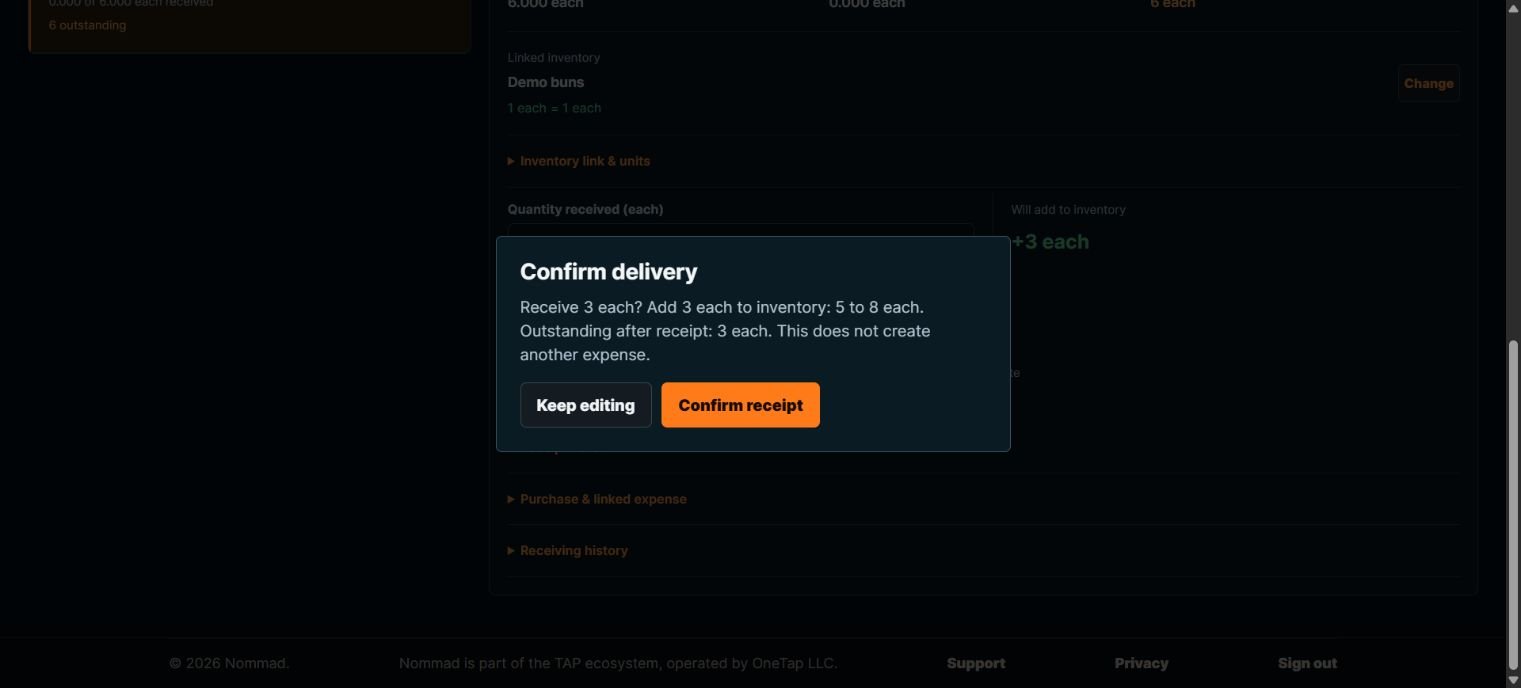
- Choose Review receipt. Read Confirm delivery, including the purchase quantity, stock increase, before/after count and remaining outstanding quantity. Choose Keep editing if anything is wrong.
- Choose Confirm receipt once when the preview matches the physical delivery. Wait for the saved result. Review the updated Received, Outstanding and Inventory count.
- Repeat only when a genuinely new portion arrives. A fully received purchase leaves Awaiting Receipt; use Receiving history or All receiving history to find its saved receipts.
What Happens Next
A confirmed receipt increases the linked Inventory quantity and records delivery history once. Receiving does not create another expense.
Important To Know
Example: six each purchased, five already on hand. Receive three: stock becomes eight and three remain outstanding. Receive the final three later: stock becomes eleven.
For packs, verify the explicit mapping, such as one sleeve = 50 each; receiving half a sleeve should add 25 each, not half an item. Never infer a pack size.
If saved stock or mapping changed elsewhere, refresh saved records and review again. Refresh saved records preserves your receipt quantity/notes; it is not the browser Refresh command.
Do not receive again just because the network response was uncertain. Check saved history first. Previously received quantities and conversions cannot be rewritten casually.
Common Problems
- Quantity exceeds outstanding
- Enter only the amount still unreceived. Check whether another person already received part of it.
- Review receipt is blocked
- Save the Inventory mapping, fix missing/ambiguous units, check permissions and read any review message.
- The purchase completed elsewhere
- Keep your draft for reference and inspect saved history; do not post another receipt.