What You Can Do
Track ingredients, drinks, packaging and supplies with consistent stock units and honest cost estimates.
Before You Begin
Count the item physically and decide the unit in which you will hold stock, such as each or lb. Do not use case and each interchangeably.
Know whether the price is per stock unit, for a pack, or not yet known. A confirmed free item is different from an unknown price.
How To Do It
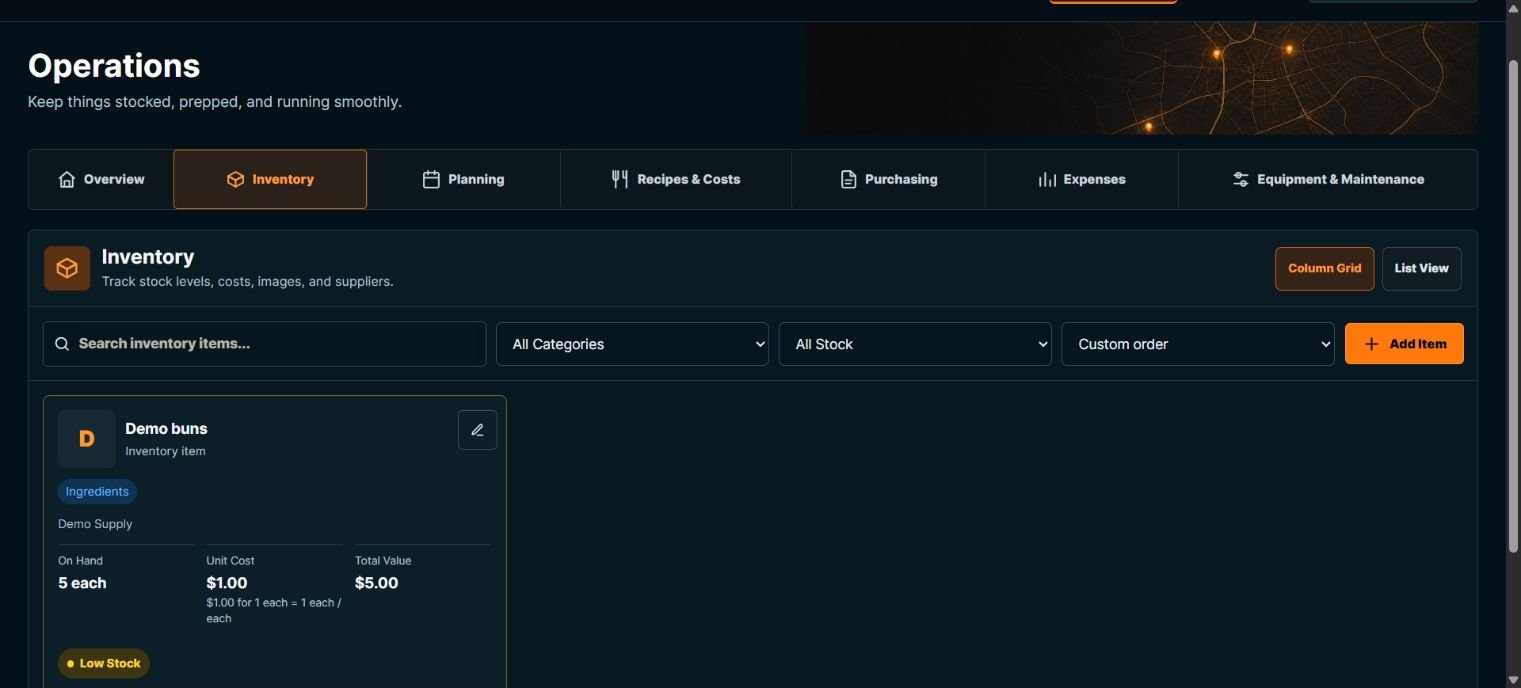
- Open Operations > Inventory and choose Add Item.
- Enter Item Name and Category. Choose an Existing supplier, leave No supplier, or choose Create supplier and complete New supplier name and any contact details.
- Enter On Hand as the actual opening count and Unit as the stock unit. Add an Item Image if useful.
- Choose Cost basis: Unknown / needs review, Price per stock unit, or Pack / purchase price. Enter the matching price and quantity fields and check the calculated unit cost. For a pack, state how much stock the pack contains.
- Set Low-stock alert at and add Notes. Choose Add Item. Check the saved quantity, unit, cost, value and Low Stock status.
- Use search, category, stock status and sort controls to find an item. Switch Column Grid or List View when useful. Choose Edit beside the item to change its saved details.
What Happens Next
The opening count becomes saved stock. Supplier creation and cost estimates do not create a purchase, delivery receipt or expense. Linked recipes can use this item and its current cost basis.
Important To Know
If cost is incomplete, recipe profit and margin remain unavailable. Do not enter zero just to make a calculation appear.
Set an alert in the same stock unit. It is a warning, not an order or a promise that enough stock exists for a plan.
Do not overwrite a quantity to conceal an unexplained discrepancy; review movements and use a deliberate correction.
Common Problems
- A recipe cannot use the quantity
- Check that the recipe unit matches the stock unit or has a valid item-specific conversion.
- Stock did not increase after editing price
- Price changes update an estimate, not physical stock. Use Receiving for a delivery.