What You Can Do
Connect menu items to inventory amounts and understand estimated serving cost, profit and margin.
Before You Begin
Create the ingredients in Inventory and confirm stock units/cost basis. Create the sellable Menu item if you want to link it; an unlinked recipe can use its own comparison price.
Know the recipe yield: the number of servings produced by the ingredient amounts you are entering.
How To Do It
- Open Operations > Recipes & Costs and choose Add Recipe.
- Enter Recipe Name and Category. Select the Menu Item if applicable. Set Yield and Yield Unit.
- Enter Comparison price (estimate), or select Use selected menu price. This copies a comparison price; it does not edit the public menu price. Add Description and Prep instructions, then choose Create Recipe.
- Choose Add Ingredient. Select the Inventory Item, enter Amount and Unit, and any Waste allowance (%) and Notes. Choose Add Ingredient.
- Repeat for every ingredient and necessary consumable. Use Edit ingredient to correct an amount, unit or allowance. Use Edit Recipe to change yield and recipe details.
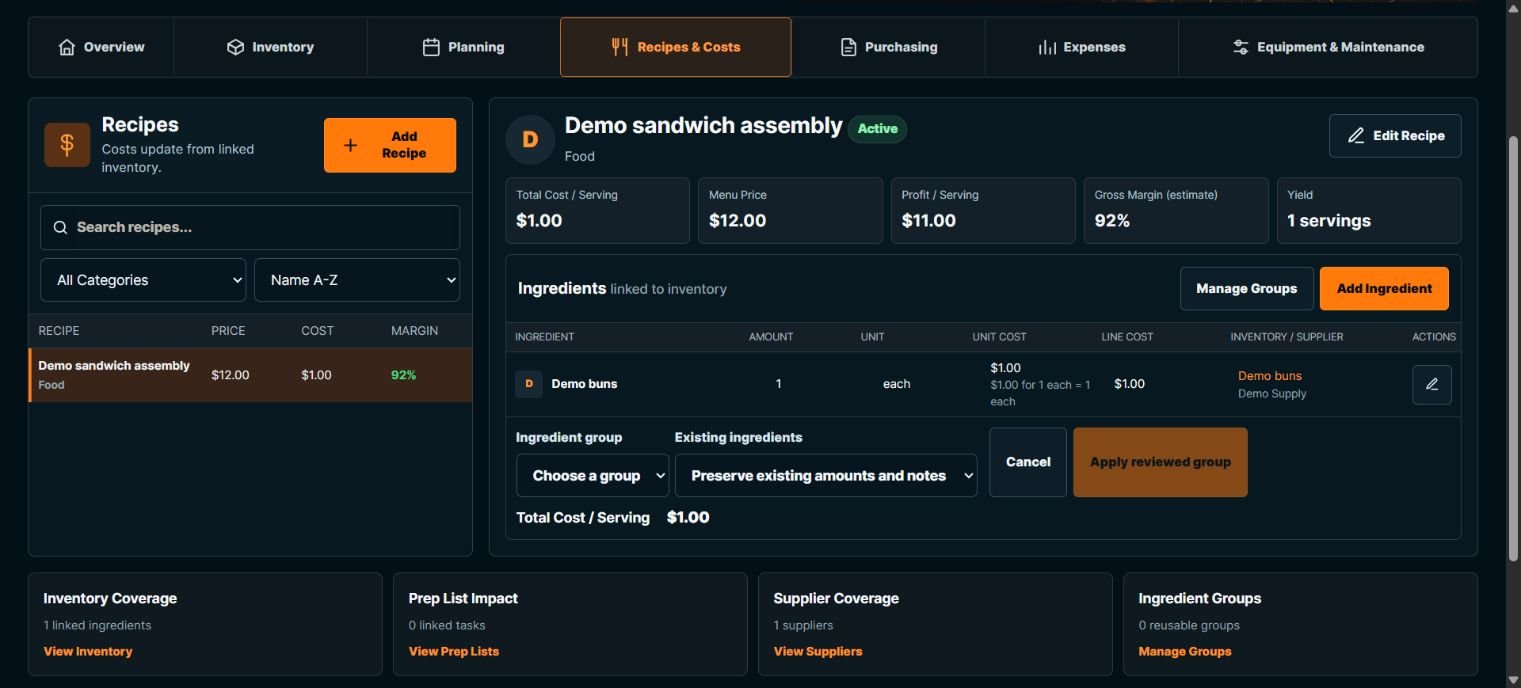
- Review Total Cost / Serving, Menu Price, Profit / Serving and Gross Margin (estimate). Follow Inventory, Supplier or Prep links to check the source records.
What Happens Next
Linked current inventory costs contribute to the estimate. Recipe ingredient amounts are divided by yield to calculate serving requirements. The recipe can be selected in Production Planner.
Important To Know
An ingredient amount describes the whole stated yield, not automatically one serving. For a yield of 10, enter the ingredients needed for those 10 servings.
Missing costs, invalid amounts, zero yield or incompatible units can make the estimate Incomplete. A known subtotal is not the complete recipe cost.
The current recipe composer offers Active status; Draft is disabled in this build. Do not assume an unlinked recipe is a private published-menu draft.
A $12 comparison price and $1 ingredient cost give $11 estimated gross profit and about 92% gross margin before other costs. These are not accounting profit or recorded revenue.
Changing inventory costs can change current recipe estimates. Historical expense amounts are separate saved records.
Common Problems
- Cost is Incomplete
- Check every linked ingredient, positive amount, yield, cost basis and unit conversion.
- The price differs from Menu
- Use selected menu price deliberately when you want a fresh comparison; do not assume a copied estimate is always synchronized.